
AI-Augmented Workflow & Agentic CRM Dashboard (WIP)
Project Type:
My AI Workflow Demo & Agentic UI Concept
Project Date
2026
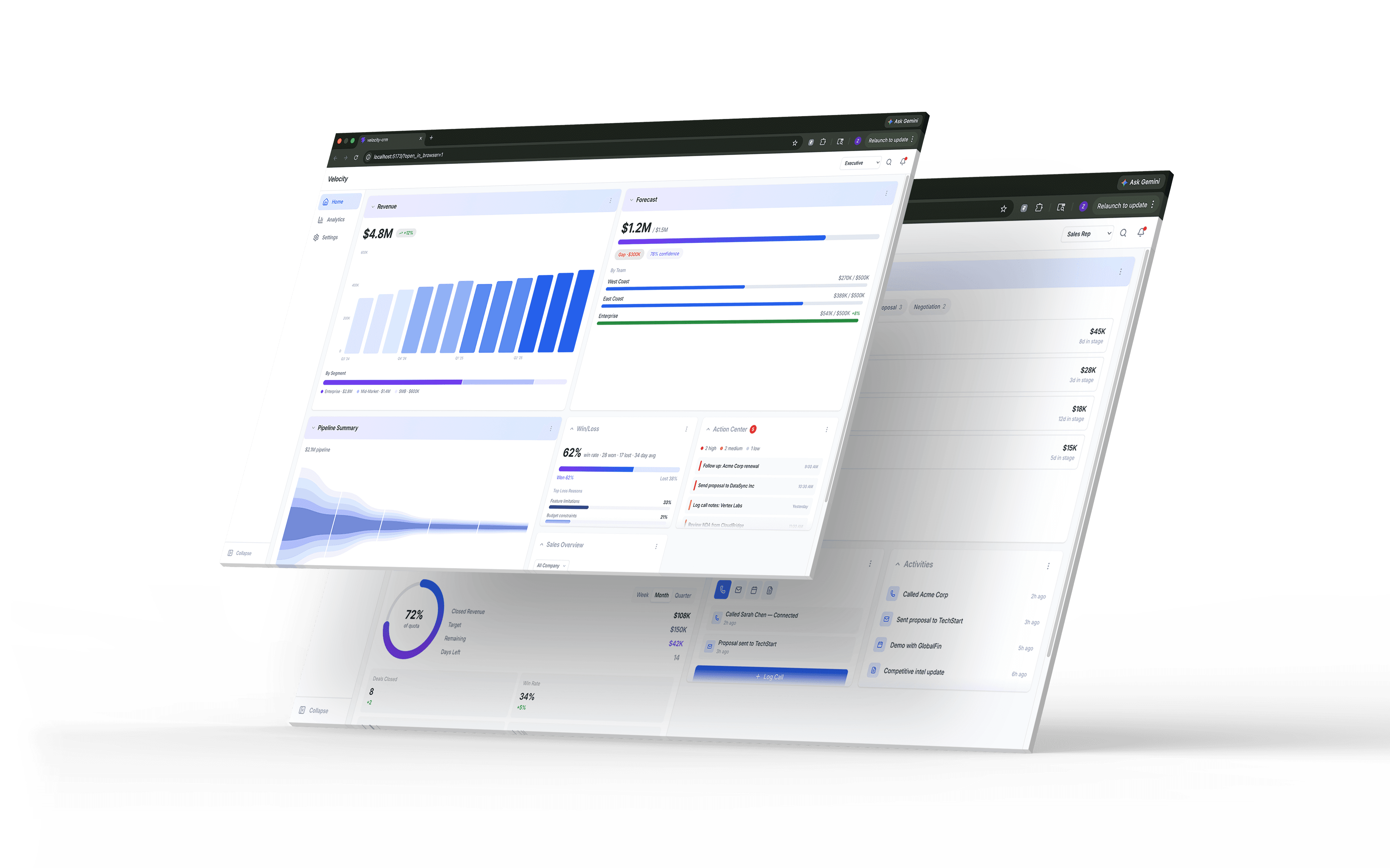
Role-Based, Dynamic Agentic UI
Full AI-Accelerated Workflow
Role-Based, Dynamic Agentic UI
Full AI-Accelerated Workflow
Full AI-Augmented Workflow
Every phase produces something real: a spec, a token file, a prototype. The workflow fits inside a standard Figma-based pipeline, or it cuts the design file out and ships tokens straight to code. I built it as a bridge between how design teams work now and where AI takes them next.
AI layer
Designer
Output
Phase 1
Brief & alignment
Synthesizes research into structured briefs, role models, and success metrics
Defines scope, validates assumptions, approves direction
Brief & user model
→ brief.md
Phase 2
System architecture
Generates module architecture, interaction rules, and behavioral constraints
Refines information hierarchy, sets design boundaries, resolves conflicts
Architecture spec
→ architecture.md
Phase 3
Design system
Creates or applies design tokens, builds component variants, assembles layouts via Figma MCP or code
Refines visual details, ensures consistency, directs redesigns
Design system & Figma file || code
→ design-tokens.json
Phase 4
Layout engine
Generates layout configs, agent behavior specs, and display state rules
Reviews AI boundaries, defines user control patterns, validates logic
Layout config & agent spec
→ layout-config.json
→ phase5-handoff.md
Phase 5
Prototype
Scaffolds project, ports tokens, builds components from design specs
Reviews output, catches errors, prioritizes what ships
Working prototype
→ Live prototype
Full AI-Augmented Workflow
Every phase produces something real: a spec, a token file, a prototype. The workflow fits inside a standard Figma-based pipeline, or it cuts the design file out and ships tokens straight to code. I built it as a bridge between how design teams work now and where AI takes them next.
AI layer
Designer
Output
Phase 1
Brief & alignment
Synthesizes research into structured briefs, role models, and success metrics
Defines scope, validates assumptions, approves direction
Brief & user model
→ brief.md
Phase 2
System architecture
Generates module architecture, interaction rules, and behavioral constraints
Refines information hierarchy, sets design boundaries, resolves conflicts
Architecture spec
→ architecture.md
Phase 3
Design system
Creates or applies design tokens, builds component variants, assembles layouts via Figma MCP or code
Refines visual details, ensures consistency, directs redesigns
Design system & Figma file || code
→ design-tokens.json
Phase 4
Layout engine
Generates layout configs, agent behavior specs, and display state rules
Reviews AI boundaries, defines user control patterns, validates logic
Layout config & agent spec
→ layout-config.json
→ phase5-handoff.md
Phase 5
Prototype
Scaffolds project, ports tokens, builds components from design specs
Reviews output, catches errors, prioritizes what ships
Working prototype
→ Live prototype
Full AI-Augmented Workflow
Every phase produces something real: a spec, a token file, a prototype. The workflow fits inside a standard Figma-based pipeline, or it cuts the design file out and ships tokens straight to code. I built it as a bridge between how design teams work now and where AI takes them next.
AI layer
Designer
Output
Phase 1
Brief & alignment
Synthesizes research into structured briefs, role models, and success metrics
Defines scope, validates assumptions, approves direction
Brief & user model
→ brief.md
Phase 2
System architecture
Generates module architecture, interaction rules, and behavioral constraints
Refines information hierarchy, sets design boundaries, resolves conflicts
Architecture spec
→ architecture.md
Phase 3
Design system
Creates or applies design tokens, builds component variants, assembles layouts via Figma MCP or code
Refines visual details, ensures consistency, directs redesigns
Design system & Figma file || code
→ design-tokens.json
Phase 4
Layout engine
Generates layout configs, agent behavior specs, and display state rules
Reviews AI boundaries, defines user control patterns, validates logic
Layout config & agent spec
→ layout-config.json
→ phase5-handoff.md
Phase 5
Prototype
Scaffolds project, ports tokens, builds components from design specs
Reviews output, catches errors, prioritizes what ships
Working prototype
→ Live prototype
Scroll horizontally to view full table!
Full AI-Augmented Workflow
Every phase produces something real: a spec, a token file, a prototype. The workflow fits inside a standard Figma-based pipeline, or it cuts the design file out and ships tokens straight to code. I built it as a bridge between how design teams work now and where AI takes them next.
AI layer
Designer
Output
Phase 1
Brief & alignment
Synthesizes research into structured briefs, role models, and success metrics
Defines scope, validates assumptions, approves direction
Brief & user model
→ brief.md
Phase 2
System architecture
Generates module architecture, interaction rules, and behavioral constraints
Refines information hierarchy, sets design boundaries, resolves conflicts
Architecture spec
→ architecture.md
Phase 3
Design system
Creates or applies design tokens, builds component variants, assembles layouts via Figma MCP or code
Refines visual details, ensures consistency, directs redesigns
Design system & Figma file || code
→ design-tokens.json
Phase 4
Layout engine
Generates layout configs, agent behavior specs, and display state rules
Reviews AI boundaries, defines user control patterns, validates logic
Layout config & agent spec
→ layout-config.json
→ phase5-handoff.md
Phase 5
Prototype
Scaffolds project, ports tokens, builds components from design specs
Reviews output, catches errors, prioritizes what ships
Working prototype
→ Live prototype
Inside My Design Process with AI
Phase 1: Teaching AI the Problem Before It Starts Solving
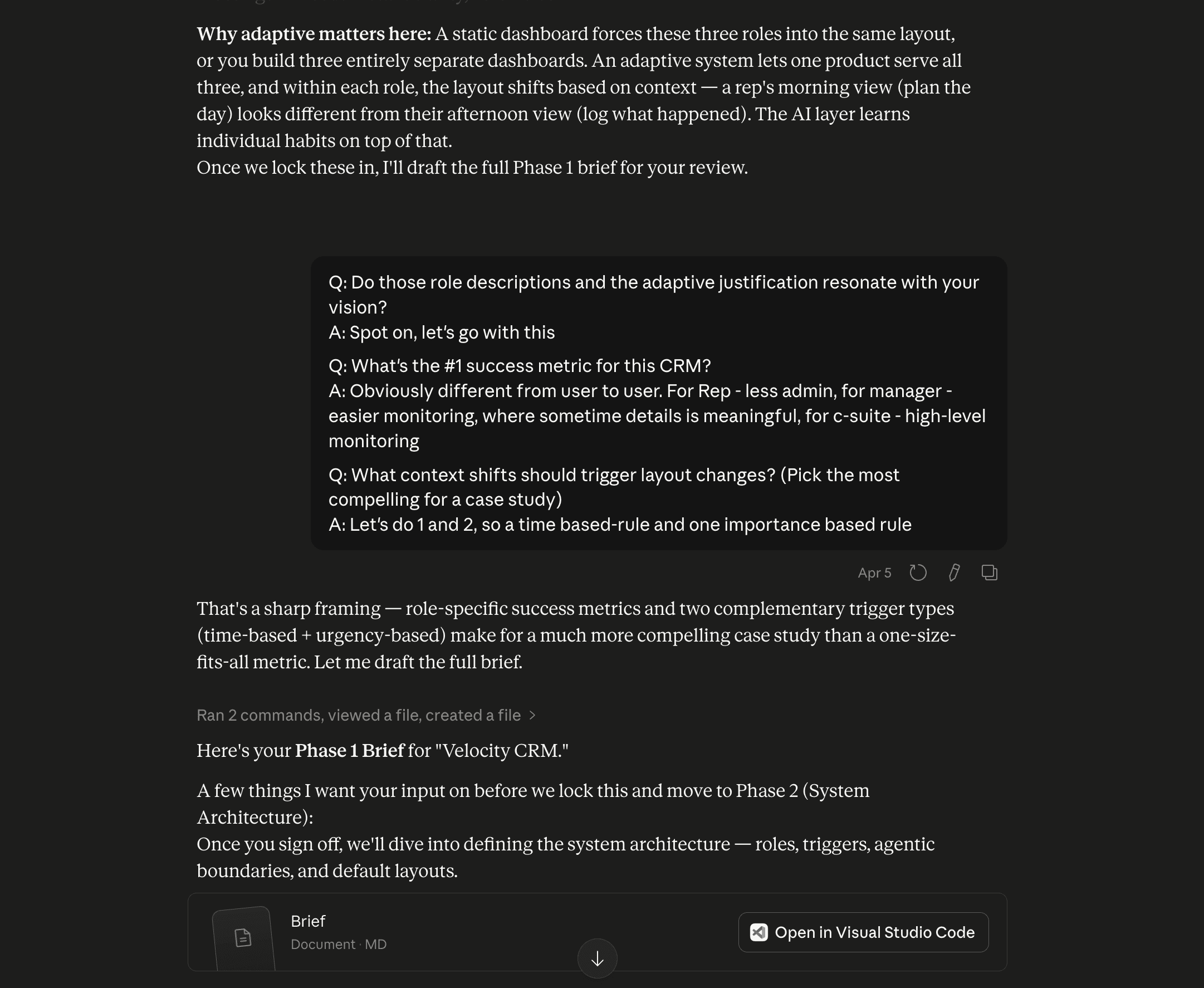
I gave AI a rough product direction. It came back with a structured brief covering user profiles, pain points, success criteria, and edge cases. I pressure-tested the assumptions, scoped the project, and locked the direction before moving forward.
With existing research or meeting notes as input, this phase gets even faster. The AI has more to work with from the start.
Phase 2: Guiding AI Through the System's First Draft
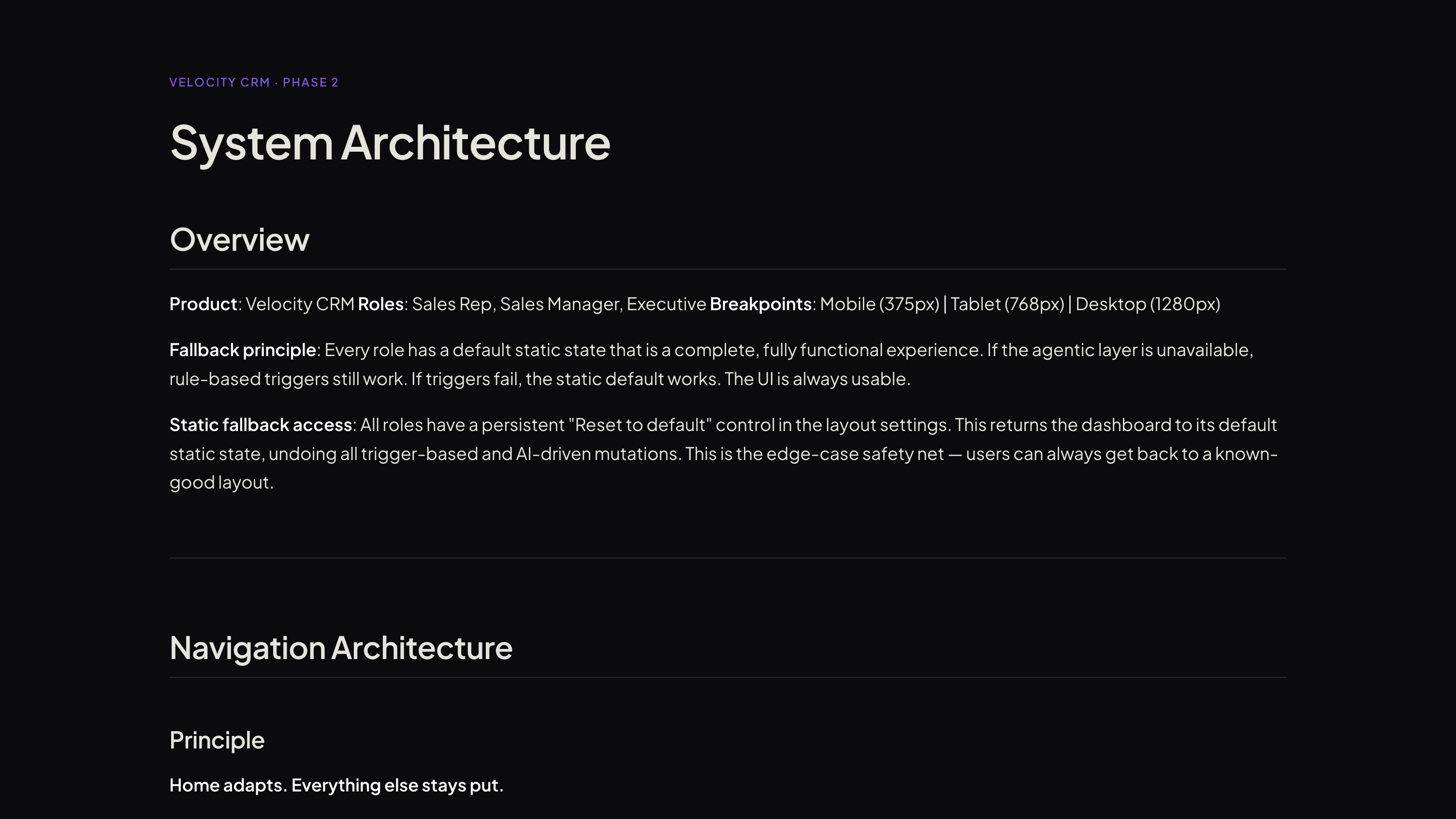
AI used the brief to draft the system architecture: module set, navigation rules, information hierarchy, and how the UI responds to different contexts.
I shaped the structure, corrected color and hierarchy decisions, and defined the rules for how each module behaves.
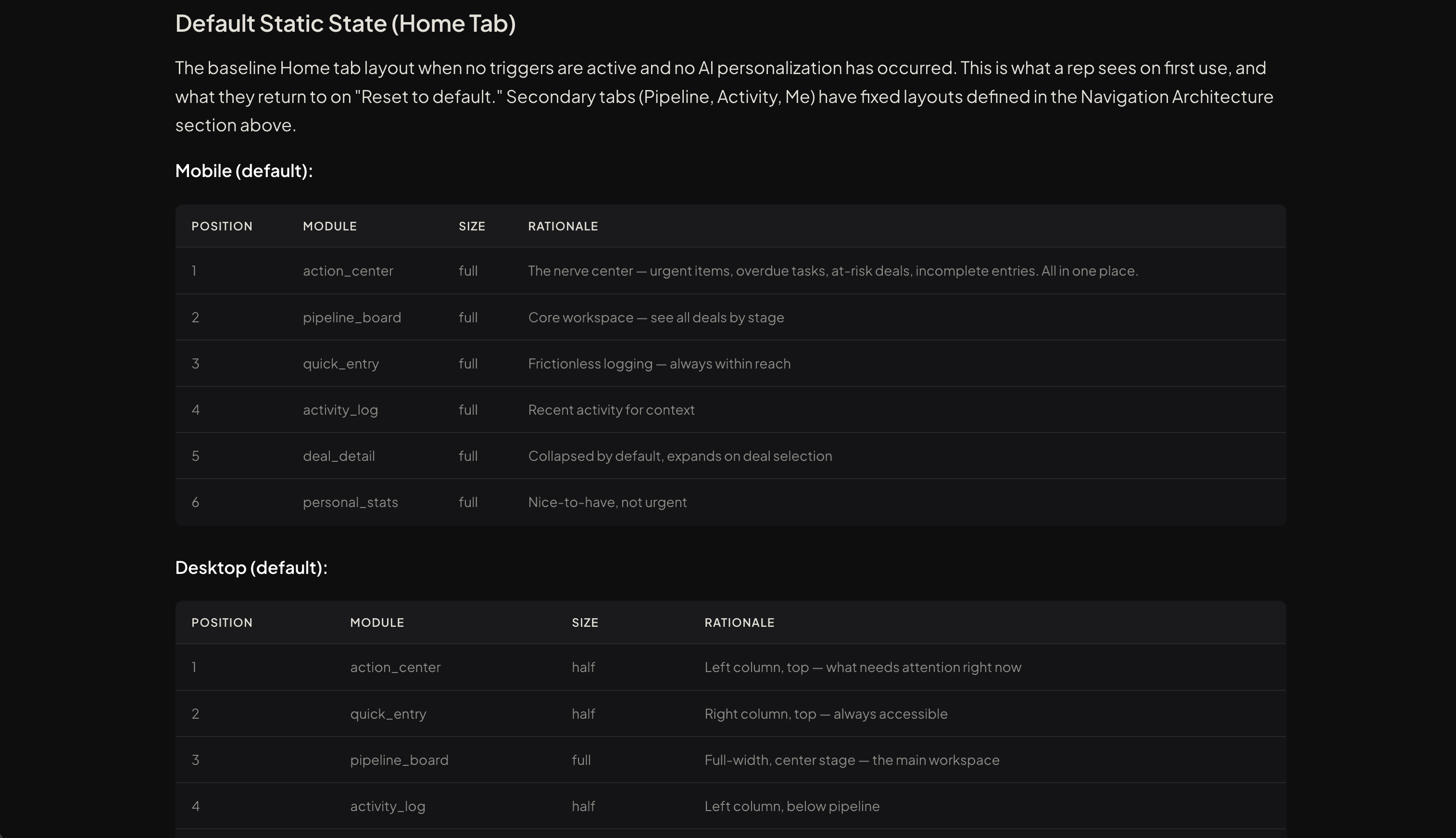
Phase 3: Coaching AI to Build Design System That is Well-Designed
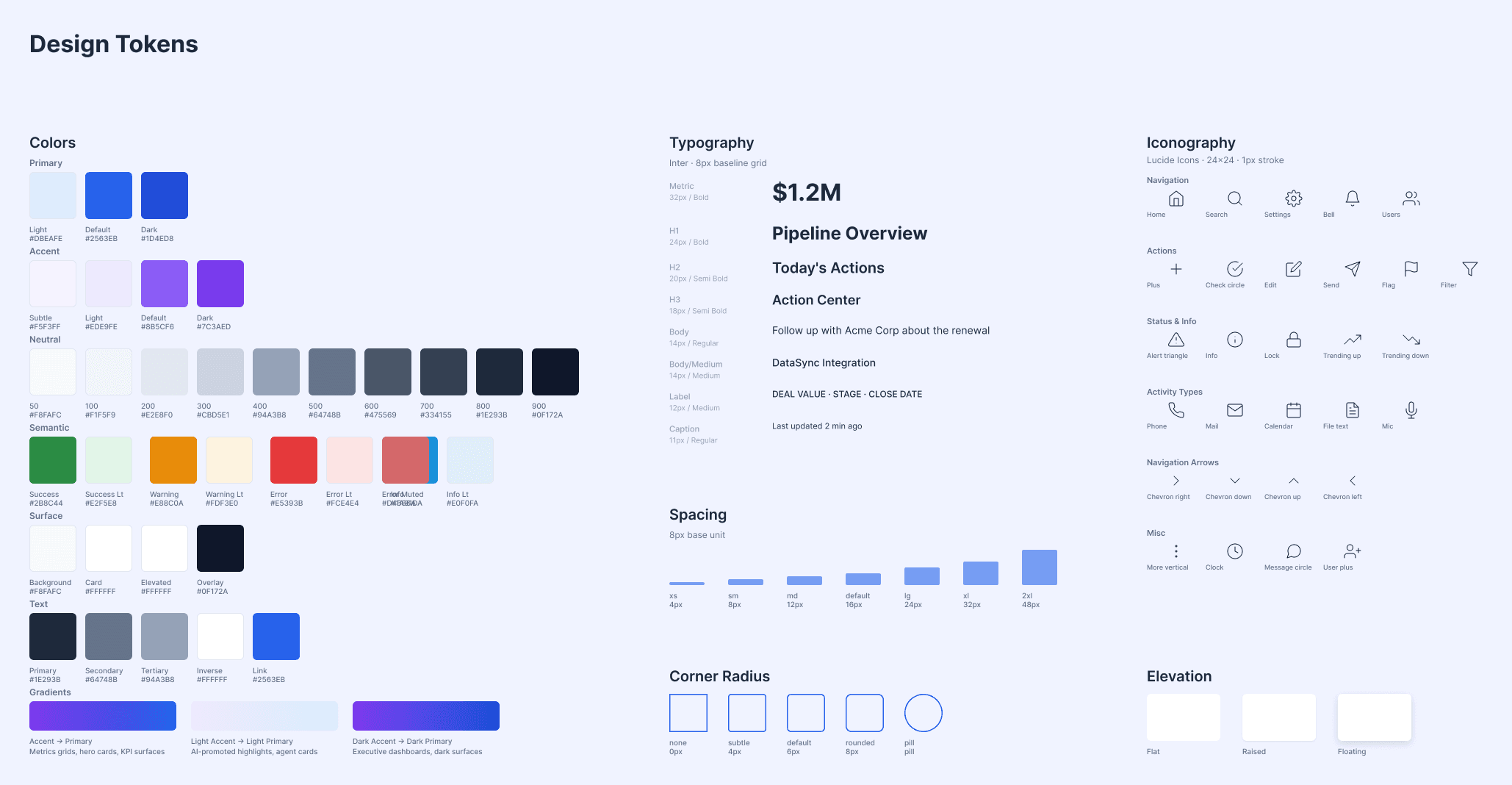
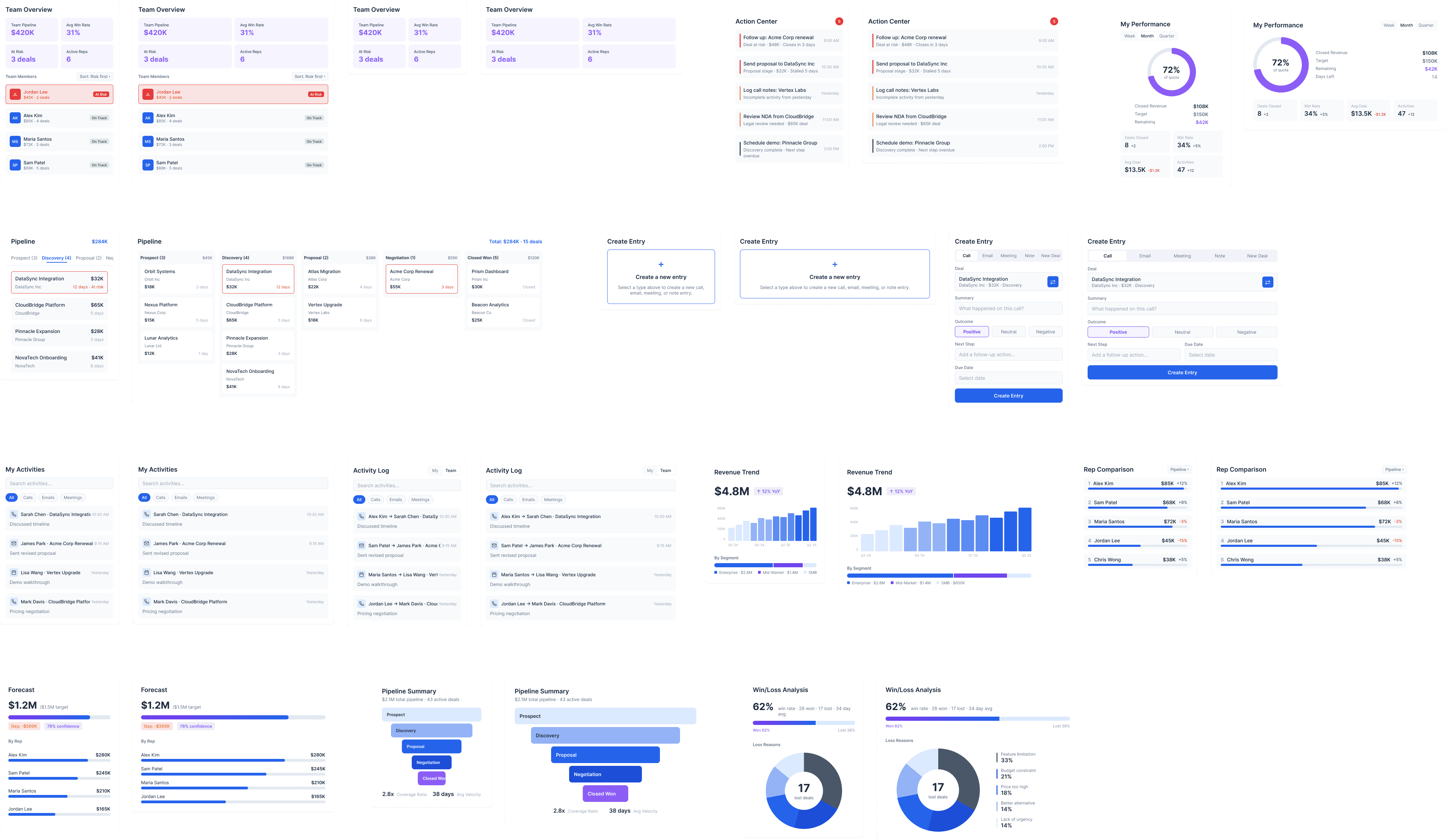
AI-generated design tokens and built the component library directly in Figma through the Plugin API. I created the color system, redesigned components that doesn't answer users' needs, and corrected the design system when AI reached for the wrong patterns.
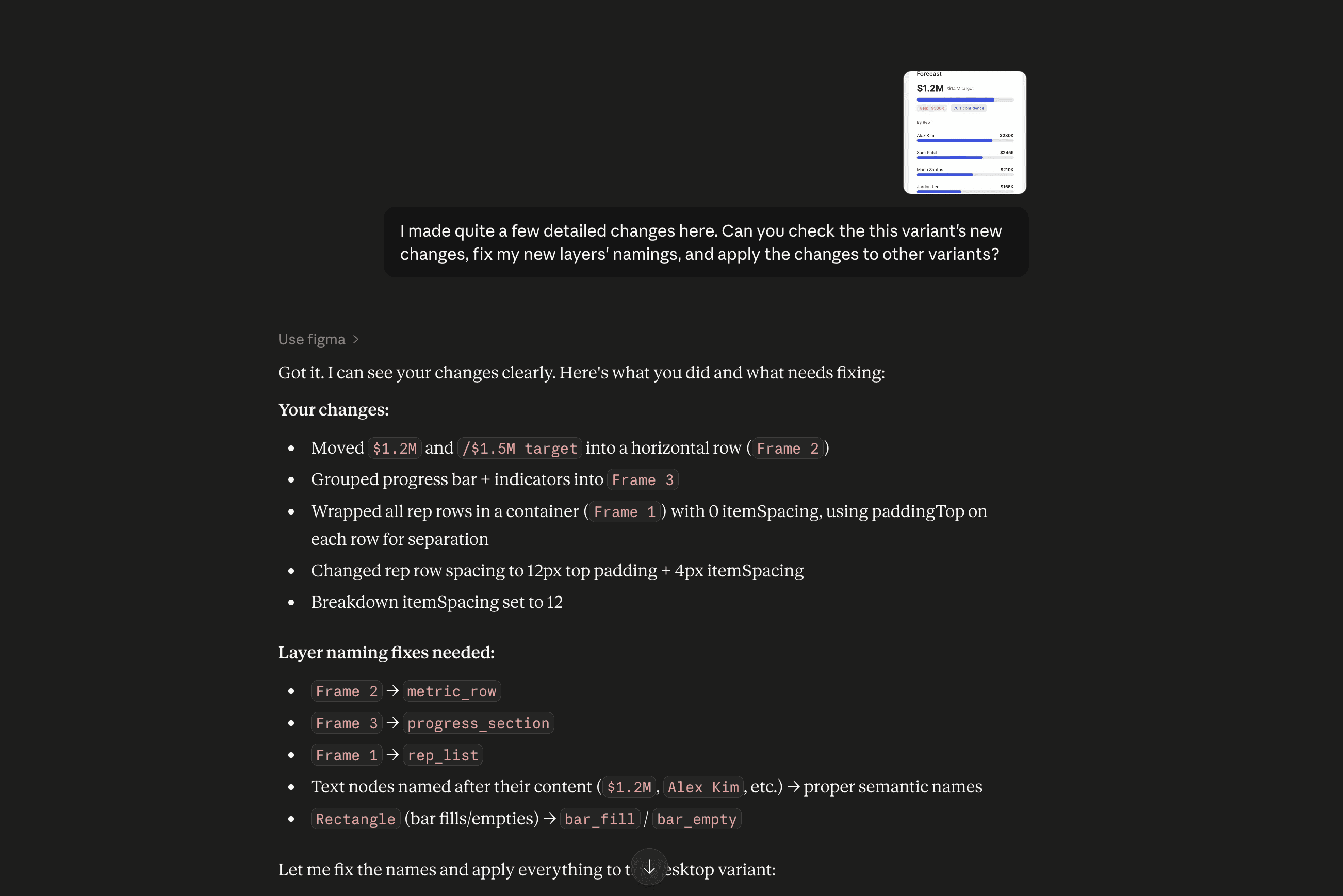
It also handles iteration, not just first drafts, so the workflow works inside existing design systems.
Phase 4: Setting the Boundaries AI Thinks Within
AI wrote the layout configuration and behavioral rules for the product. I rewrote the logic where it didn't match how users actually work, designed the interaction patterns for user control, and defined the constraints the system operates within.
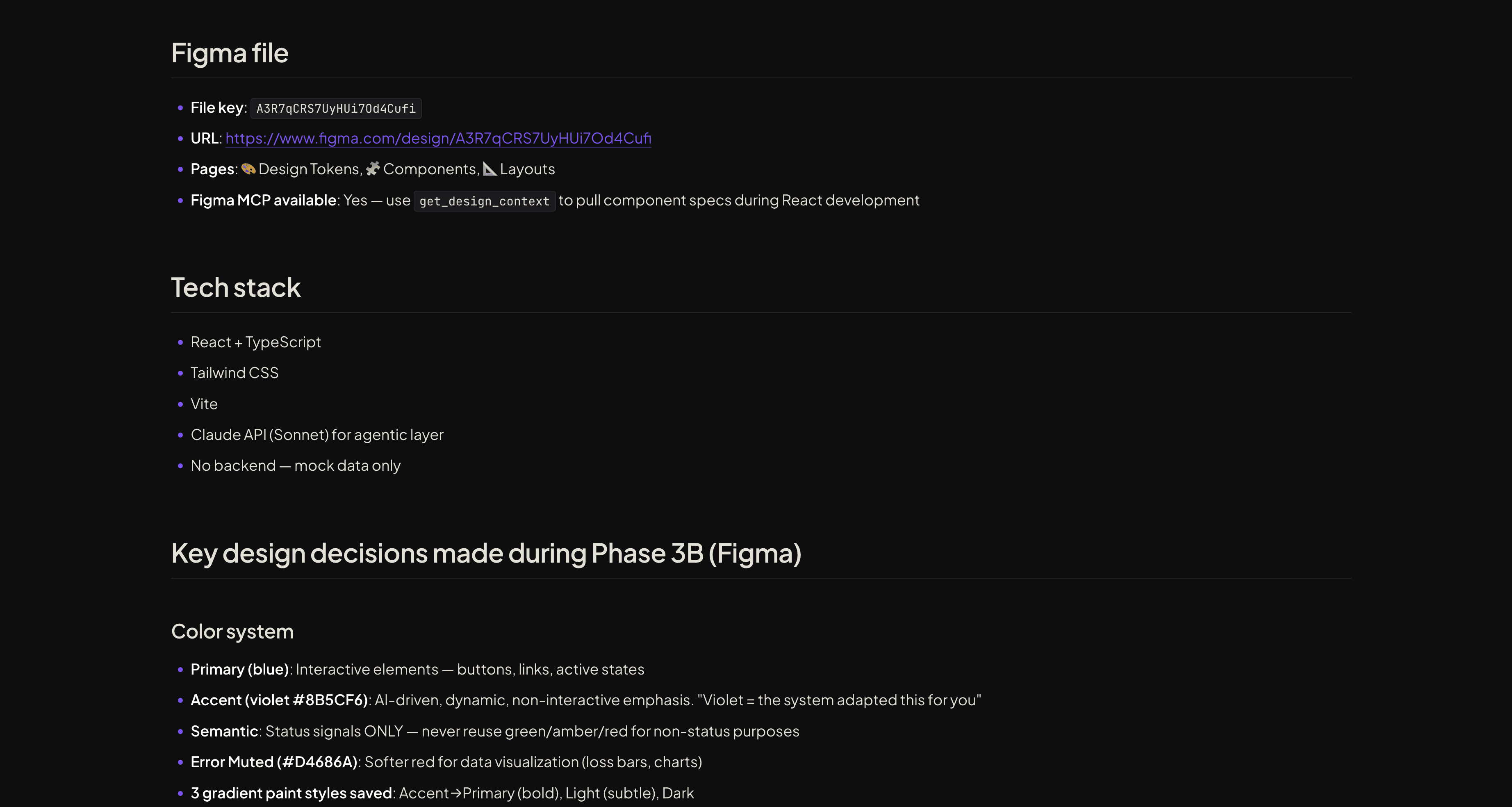
The phase outputs a handoff file that captures every design decision, spec, and artifact from the earlier phases. It works for continuing the project in Claude Code, or for handing the work to engineers in a traditional workflow.
Phase 5: Reviewing AI's Work Before It Ships
AI built the React prototype straight from the tokens and specs it produced earlier. Nothing got redesigned or re-exported. I reviewed what it built, fixed what broke, and called what was ready to ship.
Same components, different roles. The layout changes when users switch between Rep, Manager, and Executive.
Dragging the window from desktop to mobile: the bento grid rearranges on its own and stays responsive.
Hovers, transitions, and micro-interactions that match end-product quality.
Inside My Design Process with AI
Phase 1: Teaching AI the Problem Before It Starts Solving
I gave AI a rough product direction. It came back with a structured brief covering user profiles, pain points, success criteria, and edge cases. I pressure-tested the assumptions, scoped the project, and locked the direction before moving forward.
With existing research or meeting notes as input, this phase gets even faster. The AI has more to work with from the start.
Phase 2: Guiding AI Through the System's First Draft
AI used the brief to draft the system architecture: module set, navigation rules, information hierarchy, and how the UI responds to different contexts.
I shaped the structure, corrected color and hierarchy decisions, and defined the rules for how each module behaves.
Phase 3: Coaching AI to Build Design System That is Well-Designed
AI-generated design tokens and built the component library directly in Figma through the Plugin API. I created the color system, redesigned components that doesn't answer users' needs, and corrected the design system when AI reached for the wrong patterns.
It also handles iteration, not just first drafts, so the workflow works inside existing design systems.
Phase 4: Setting the Boundaries AI Thinks Within
AI wrote the layout configuration and behavioral rules for the product. I rewrote the logic where it didn't match how users actually work, designed the interaction patterns for user control, and defined the constraints the system operates within.
The phase outputs a handoff file that captures every design decision, spec, and artifact from the earlier phases. It works for continuing the project in Claude Code, or for handing the work to engineers in a traditional workflow.
Phase 5: Reviewing AI's Work Before It Ships
AI built the React prototype straight from the tokens and specs it produced earlier. Nothing got redesigned or re-exported. I reviewed what it built, fixed what broke, and called what was ready to ship.
Same components, different roles. The layout changes when users switch between Rep, Manager, and Executive.
Dragging the window from desktop to mobile: the bento grid rearranges on its own and stays responsive.
Hovers, transitions, and micro-interactions that match end-product quality.
Inside My Design Process with AI
Phase 1: Teaching AI the Problem Before It Starts Solving
I gave AI a rough product direction. It came back with a structured brief covering user profiles, pain points, success criteria, and edge cases. I pressure-tested the assumptions, scoped the project, and locked the direction before moving forward.
With existing research or meeting notes as input, this phase gets even faster. The AI has more to work with from the start.
Phase 2: Guiding AI Through the System's First Draft
AI used the brief to draft the system architecture: module set, navigation rules, information hierarchy, and how the UI responds to different contexts.
I shaped the structure, corrected color and hierarchy decisions, and defined the rules for how each module behaves.
Phase 3: Coaching AI to Build Design System That is Well-Designed
AI-generated design tokens and built the component library directly in Figma through the Plugin API. I created the color system, redesigned components that doesn't answer users' needs, and corrected the design system when AI reached for the wrong patterns.
It also handles iteration, not just first drafts, so the workflow works inside existing design systems.
Phase 4: Setting the Boundaries AI Thinks Within
AI wrote the layout configuration and behavioral rules for the product. I rewrote the logic where it didn't match how users actually work, designed the interaction patterns for user control, and defined the constraints the system operates within.
The phase outputs a handoff file that captures every design decision, spec, and artifact from the earlier phases. It works for continuing the project in Claude Code, or for handing the work to engineers in a traditional workflow.
Phase 5: Reviewing AI's Work Before It Ships
AI built the React prototype straight from the tokens and specs it produced earlier. Nothing got redesigned or re-exported. I reviewed what it built, fixed what broke, and called what was ready to ship.
Same components, different roles. The layout changes when users switch between Rep, Manager, and Executive.
Dragging the window from desktop to mobile: the bento grid rearranges on its own and stays responsive.
Hovers, transitions, and micro-interactions that match end-product quality.
Inside My Design Process with AI
Phase 1: Teaching AI the Problem Before It Starts Solving
I gave AI a rough product direction. It came back with a structured brief covering user profiles, pain points, success criteria, and edge cases. I pressure-tested the assumptions, scoped the project, and locked the direction before moving forward.
With existing research or meeting notes as input, this phase gets even faster. The AI has more to work with from the start.
Phase 2: Guiding AI Through the System's First Draft
AI used the brief to draft the system architecture: module set, navigation rules, information hierarchy, and how the UI responds to different contexts.
I shaped the structure, corrected color and hierarchy decisions, and defined the rules for how each module behaves.
Phase 3: Coaching AI to Build Design System That is Well-Designed
AI-generated design tokens and built the component library directly in Figma through the Plugin API. I created the color system, redesigned components that doesn't answer users' needs, and corrected the design system when AI reached for the wrong patterns.
It also handles iteration, not just first drafts, so the workflow works inside existing design systems.
Phase 4: Setting the Boundaries AI Thinks Within
AI wrote the layout configuration and behavioral rules for the product. I rewrote the logic where it didn't match how users actually work, designed the interaction patterns for user control, and defined the constraints the system operates within.
The phase outputs a handoff file that captures every design decision, spec, and artifact from the earlier phases. It works for continuing the project in Claude Code, or for handing the work to engineers in a traditional workflow.
Phase 5: Reviewing AI's Work Before It Ships
AI built the React prototype straight from the tokens and specs it produced earlier. Nothing got redesigned or re-exported. I reviewed what it built, fixed what broke, and called what was ready to ship.
Same components, different roles. The layout changes when users switch between Rep, Manager, and Executive.
Dragging the window from desktop to mobile: the bento grid rearranges on its own and stays responsive.
Hovers, transitions, and micro-interactions that match end-product quality.