
AI-Augmented Workflow & Agentic CRM Dashboard
Project Type:
My AI Workflow Demo & Agentic UI Concept
Project Date
2026
*Video made with Seedance AI
Role-Based, Dynamic Agentic UI
Full AI-Accelerated Workflow
Live demo
Live Prototype Link: https://velocity-crm-agentic.vercel.app/
Some interactions to try (agent changes start working over the first 3-5 sessions, refresh to start a new session):
Open the Agent panel in the top-right to see the ranking and reasoning
Click a Pipeline stage tab/pill - it will become the default tab
Expand/collapse a module - your preference become default
Frequently click or hover over a module - it will gets bump to higher orders
Live demo
Live Prototype Link: https://velocity-crm-agentic.vercel.app/
Some interactions to try (agent changes start working over the first 3-5 sessions, refresh to start a new session):
Open the Agent panel in the top-right to see the ranking and reasoning
Click a Pipeline stage tab/pill - it will become the default tab
Expand/collapse a module - your preference become default
Frequently click or hover over a module - it will gets bump to higher orders
Live demo
Live Prototype Link: https://velocity-crm-agentic.vercel.app/
Some interactions to try (agent changes start working over the first 3-5 sessions, refresh to start a new session):
Open the Agent panel in the top-right to see the ranking and reasoning
Click a Pipeline stage tab/pill - it will become the default tab
Expand/collapse a module - your preference become default
Frequently click or hover over a module - it will gets bump to higher orders
Live demo
Live Prototype Link: https://velocity-crm-agentic.vercel.app/
Some interactions to try (agent changes start working over the first 3-5 sessions, refresh to start a new session):
Open the Agent panel in the top-right to see the ranking and reasoning
Click a Pipeline stage tab/pill - it will become the default tab
Expand/collapse a module - your preference become default
Frequently click or hover over a module - it will gets bump to higher orders
Background
A CRM Built for Everyone is A CRM for No One

CRM dashboards have always had a reputation problem. Sales teams describe them as legacy, bloated, and hard to work with. They get used because they have to be, not because they help.
Through my work alongside teams that lived inside these tools, the complaints came in patterns. Reps wanted speed and field-friendliness. Managers wanted visibility into team performance. Executives wanted forecast accuracy and trend signals. The same product was failing each of them in different ways.
Why this Gap Matters


Sales reps spend just 28% of their work week actually selling (Salesforce State of Sales), and 20–70% of CRM implementation projects fail, with poor user adoption as the leading cause. Whatever closes that gap translates directly into selling time and pipeline outcomes.
My Solution: Designed for the Role. Personalized for the Person
Role-based design solves the macro problem of who needs what. AI earns its place on the micro problem of how each person actually works within their role.
Background
A CRM Built for Everyone is A CRM for No One
CRM dashboards have always had a reputation problem. Sales teams describe them as legacy, bloated, and hard to work with. They get used because they have to be, not because they help.
Through my work alongside teams that lived inside these tools, the complaints came in patterns. Reps wanted speed and field-friendliness. Managers wanted visibility into team performance. Executives wanted forecast accuracy and trend signals. The same product was failing each of them in different ways.
Why this Gap Matters
Sales reps spend just 28% of their work week actually selling (Salesforce State of Sales), and 20–70% of CRM implementation projects fail, with poor user adoption as the leading cause. Whatever closes that gap translates directly into selling time and pipeline outcomes.
My Solution: Designed for the Role. Personalized for the Person
Role-based design solves the macro problem of who needs what. AI earns its place on the micro problem of how each person actually works within their role.
Background
A CRM Built for Everyone is A CRM for No One
CRM dashboards have always had a reputation problem. Sales teams describe them as legacy, bloated, and hard to work with. They get used because they have to be, not because they help.
Through my work alongside teams that lived inside these tools, the complaints came in patterns. Reps wanted speed and field-friendliness. Managers wanted visibility into team performance. Executives wanted forecast accuracy and trend signals. The same product was failing each of them in different ways.
Why this Gap Matters
Sales reps spend just 28% of their work week actually selling (Salesforce State of Sales), and 20–70% of CRM implementation projects fail, with poor user adoption as the leading cause. Whatever closes that gap translates directly into selling time and pipeline outcomes.
My Solution: Designed for the Role. Personalized for the Person
Role-based design solves the macro problem of who needs what. AI earns its place on the micro problem of how each person actually works within their role.
Background
A CRM Built for Everyone is A CRM for No One
CRM dashboards have always had a reputation problem. Sales teams describe them as legacy, bloated, and hard to work with. They get used because they have to be, not because they help.
Through my work alongside teams that lived inside these tools, the complaints came in patterns. Reps wanted speed and field-friendliness. Managers wanted visibility into team performance. Executives wanted forecast accuracy and trend signals. The same product was failing each of them in different ways.
Why this Gap Matters
Sales reps spend just 28% of their work week actually selling (Salesforce State of Sales), and 20–70% of CRM implementation projects fail, with poor user adoption as the leading cause. Whatever closes that gap translates directly into selling time and pipeline outcomes.
My Solution: Designed for the Role. Personalized for the Person
Role-based design solves the macro problem of who needs what. AI earns its place on the micro problem of how each person actually works within their role.
3 Roles, 3 User Groups

Sales Rep
Needs:
Action First: Doing more than reading data
Fast Activity Login: Two taps, not ten

Sales Manager
Needs:
Monitoring and Managing: Eyes on the whole pipeline for team members
Occasional Actions: Action only when it matters

Executives
Needs:
High-level Data: Big picture on trends, no detail on individuals
3 Roles, 3 User Groups
Sales Rep
Needs:
Action First: Doing more than reading data
Fast Activity Login: Two taps, not ten
Sales Manager
Needs:
Monitoring and Managing: Eyes on the whole pipeline for team members
Occasional Actions: Action only when it matters
Executives
Needs:
High-level Data: Big picture on trends, no detail on individuals
3 Roles, 3 User Groups
Sales Rep
Needs:
Action First: Doing more than reading data
Fast Activity Login: Two taps, not ten
Sales Manager
Needs:
Monitoring and Managing: Eyes on the whole pipeline for team members
Occasional Actions: Action only when it matters
Executives
Needs:
High-level Data: Big picture on trends, no detail on individuals
3 Roles, 3 User Groups
Sales Rep
Needs:
Action First: Doing more than reading data
Fast Activity Login: Two taps, not ten
Sales Manager
Needs:
Monitoring and Managing: Eyes on the whole pipeline for team members
Occasional Actions: Action only when it matters
Executives
Needs:
High-level Data: Big picture on trends, no detail on individuals
Fully AI-Augmented Workflow
Every phase produces something real: a spec, a token file, a prototype. The workflow fits inside a standard Figma-based or Claude Design-based pipeline, or it cuts the design file out and ships tokens straight to code. I built it as a bridge between how design teams work now and where AI takes them next.
This workflow is built to scale, but not every phase is mandatory: the best results come from adapting it to each project.
AI layer
Designer
Output
Phase 1
Brief & alignment
Synthesizes research into structured briefs, role models, and success metrics
Defines scope, validates assumptions, approves direction
Brief & user model
→ brief.md
Phase 2
System architecture
Generates module architecture, interaction rules, and behavioral constraints
Refines information hierarchy, sets design boundaries, resolves conflicts
Architecture spec
→ architecture.md
Phase 3
Design system
Creates or applies design tokens, builds component variants, assembles layouts via Figma MCP or code
Refines visual details, ensures consistency, directs redesigns
Design system & Figma file || code
→ design-tokens.json
Phase 4
Layout engine
Generates layout configs, agent behavior specs, and display state rules
Reviews AI boundaries, defines user control patterns, validates logic
Layout config & agent spec
→ layout-config.json
→ phase5-handoff.md
Phase 5
Prototype
Scaffolds project, ports tokens, builds components from design specs
Reviews output, catches errors, prioritizes what ships
Working prototype
→ Live prototype
Why Does This Workflow Work?
Strategy Before Pixels
Five phases force decisions about scope, users, and success before any design work starts. Each phase is a checkpoint that catches ambiguity, scope creep, or misalignment before it compounds into a failed project.
Meets Teams Where They Are
The same workflow ships as a Figma file, as code, or through Claude Design. No team has to abandon their stack to adopt it.
Maximized AI and Engineered Handoff
AI handles the pace between phases. The artifacts it produces are structured so a human can step in at any point, review, and make the final call. Speed and judgment, not one at the expense of the other.
Flexible Tool Stack for Each Step
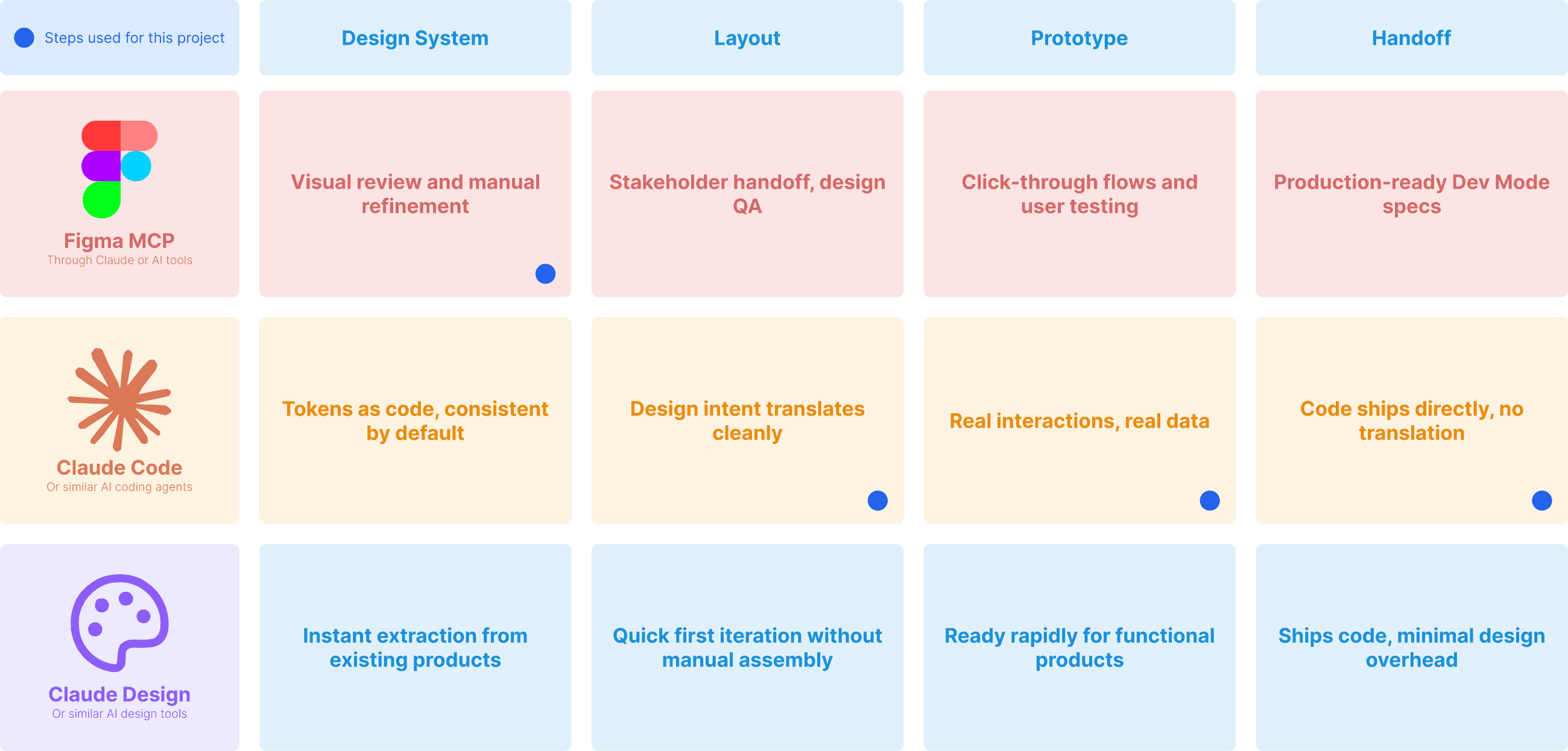
Every tool has a sweet spot. This chart maps where each one is strongest across the design pipeline, and the combination I used for Velocity CRM.
Fully AI-Augmented Workflow
Every phase produces something real: a spec, a token file, a prototype. The workflow fits inside a standard Figma-based or Claude Design-based pipeline, or it cuts the design file out and ships tokens straight to code. I built it as a bridge between how design teams work now and where AI takes them next.
This workflow is built to scale, but not every phase is mandatory: the best results come from adapting it to each project.
AI layer
Designer
Output
Phase 1
Brief & alignment
Synthesizes research into structured briefs, role models, and success metrics
Defines scope, validates assumptions, approves direction
Brief & user model
→ brief.md
Phase 2
System architecture
Generates module architecture, interaction rules, and behavioral constraints
Refines information hierarchy, sets design boundaries, resolves conflicts
Architecture spec
→ architecture.md
Phase 3
Design system
Creates or applies design tokens, builds component variants, assembles layouts via Figma MCP or code
Refines visual details, ensures consistency, directs redesigns
Design system & Figma file || code
→ design-tokens.json
Phase 4
Layout engine
Generates layout configs, agent behavior specs, and display state rules
Reviews AI boundaries, defines user control patterns, validates logic
Layout config & agent spec
→ layout-config.json
→ phase5-handoff.md
Phase 5
Prototype
Scaffolds project, ports tokens, builds components from design specs
Reviews output, catches errors, prioritizes what ships
Working prototype
→ Live prototype
Why Does This Workflow Work?
Strategy Before Pixels
Five phases force decisions about scope, users, and success before any design work starts. Each phase is a checkpoint that catches ambiguity, scope creep, or misalignment before it compounds into a failed project.
Meets Teams Where They Are
The same workflow ships as a Figma file, as code, or through Claude Design. No team has to abandon their stack to adopt it.
Maximized AI and Engineered Handoff
AI handles the pace between phases. The artifacts it produces are structured so a human can step in at any point, review, and make the final call. Speed and judgment, not one at the expense of the other.
Flexible Tool Stack for Each Step
Every tool has a sweet spot. This chart maps where each one is strongest across the design pipeline, and the combination I used for Velocity CRM.
Fully AI-Augmented Workflow
Every phase produces something real: a spec, a token file, a prototype. The workflow fits inside a standard Figma-based or Claude Design-based pipeline, or it cuts the design file out and ships tokens straight to code. I built it as a bridge between how design teams work now and where AI takes them next.
This workflow is built to scale, but not every phase is mandatory: the best results come from adapting it to each project.
AI layer
Designer
Output
Phase 1
Brief & alignment
Synthesizes research into structured briefs, role models, and success metrics
Defines scope, validates assumptions, approves direction
Brief & user model
→ brief.md
Phase 2
System architecture
Generates module architecture, interaction rules, and behavioral constraints
Refines information hierarchy, sets design boundaries, resolves conflicts
Architecture spec
→ architecture.md
Phase 3
Design system
Creates or applies design tokens, builds component variants, assembles layouts via Figma MCP or code
Refines visual details, ensures consistency, directs redesigns
Design system & Figma file || code
→ design-tokens.json
Phase 4
Layout engine
Generates layout configs, agent behavior specs, and display state rules
Reviews AI boundaries, defines user control patterns, validates logic
Layout config & agent spec
→ layout-config.json
→ phase5-handoff.md
Phase 5
Prototype
Scaffolds project, ports tokens, builds components from design specs
Reviews output, catches errors, prioritizes what ships
Working prototype
→ Live prototype
Scroll horizontally to view full table!
Why Does This Workflow Work?
Strategy Before Pixels
Five phases force decisions about scope, users, and success before any design work starts. Each phase is a checkpoint that catches ambiguity, scope creep, or misalignment before it compounds into a failed project.
Meets Teams Where They Are
The same workflow ships as a Figma file, as code, or through Claude Design. No team has to abandon their stack to adopt it.
Maximized AI and Engineered Handoff
AI handles the pace between phases. The artifacts it produces are structured so a human can step in at any point, review, and make the final call. Speed and judgment, not one at the expense of the other.
Flexible Tool Stack for Each Step
Every tool has a sweet spot. This chart maps where each one is strongest across the design pipeline, and the combination I used for Velocity CRM.
Fully AI-Augmented Workflow
Every phase produces something real: a spec, a token file, a prototype. The workflow fits inside a standard Figma-based or Claude Design-based pipeline, or it cuts the design file out and ships tokens straight to code. I built it as a bridge between how design teams work now and where AI takes them next.
This workflow is built to scale, but not every phase is mandatory: the best results come from adapting it to each project.
AI layer
Designer
Output
Phase 1
Brief & alignment
Synthesizes research into structured briefs, role models, and success metrics
Defines scope, validates assumptions, approves direction
Brief & user model
→ brief.md
Phase 2
System architecture
Generates module architecture, interaction rules, and behavioral constraints
Refines information hierarchy, sets design boundaries, resolves conflicts
Architecture spec
→ architecture.md
Phase 3
Design system
Creates or applies design tokens, builds component variants, assembles layouts via Figma MCP or code
Refines visual details, ensures consistency, directs redesigns
Design system & Figma file || code
→ design-tokens.json
Phase 4
Layout engine
Generates layout configs, agent behavior specs, and display state rules
Reviews AI boundaries, defines user control patterns, validates logic
Layout config & agent spec
→ layout-config.json
→ phase5-handoff.md
Phase 5
Prototype
Scaffolds project, ports tokens, builds components from design specs
Reviews output, catches errors, prioritizes what ships
Working prototype
→ Live prototype
Why Does This Workflow Work?
Strategy Before Pixels
Five phases force decisions about scope, users, and success before any design work starts. Each phase is a checkpoint that catches ambiguity, scope creep, or misalignment before it compounds into a failed project.
Meets Teams Where They Are
The same workflow ships as a Figma file, as code, or through Claude Design. No team has to abandon their stack to adopt it.
Maximized AI and Engineered Handoff
AI handles the pace between phases. The artifacts it produces are structured so a human can step in at any point, review, and make the final call. Speed and judgment, not one at the expense of the other.
Flexible Tool Stack for Each Step
Every tool has a sweet spot. This chart maps where each one is strongest across the design pipeline, and the combination I used for Velocity CRM.
Inside My Design Process with AI
Inside My Design Process with AI
Inside My Design Process with AI
Inside My Design Process with AI
The Static Layer - Built to Adapt Without AI
The static layer is the rules-based foundation underneath everything else: role-aware layouts, time-of-day adaptation, threshold-triggered alerts. It runs without AI, costs nothing per session, and stays functional regardless of what happens upstream.
Role Logic - 3 Config for 3 Roles
Role identity is a known input. A salesperson signs in, their account has their role attached, the layout configures itself. The system doesn't guess what it can read.
Role maps to information needs.
Sales reps need action-first layouts. Managers need pipeline-wide visibility. Executives need forecast and trend signals. These aren't preferences that vary by user, they're job functions that map to data needs.
Config beats inference.
Role-based layout is a lookup, not a prediction. Zero cost, instant speed, fully testable. Every layout works the same way for every user in that role, every time.
Forecast shows different content for each role
Contextual Logic - Time and Risk As Signals
The dashboard shifts based on observable signals: time of day, fiscal cycles, and urgency thresholds. None of these need AI to detect.
Morning mode prioritizes actions
Afternoon mode focuses on logging and review
At-risk mode surfaces deals needing attention
The signals are deterministic.
Time of day is the clock. Fiscal cycle is the calendar. Urgency thresholds are comparisons against rules. Each signal is fast to compute, easy to explain, and trivial to debug. AI would add latency and opacity to something that runs in microseconds.
The patterns are stable across users
User testing confirmed it: time-of-day and threshold-based shifts felt invisible to users. Most didn't notice the adaptation happening. They just noticed the dashboard felt right for the moment.
Why Static Layer Comes Before AI
Every product that depends on AI has a moment when the AI fails. Inference times out. The model returns nonsense. The service has an outage. Every major AI provider has had public outages this year. When that happens, the user still has a job to do, and the product still needs to be useful.

Fallback when the AI doesn't show up
When the AI fails, the dashboard doesn't. Role defaults, time-of-day shifts, and at-risk alerts keep working without it. Graceful degradation is mandatory for trust in AI products.

Stability for users who don't want surprises
User testing showed people were surprised when agentic UI helped instead of disrupted. The static layer keeps everything working for users who'd rather skip the AI.
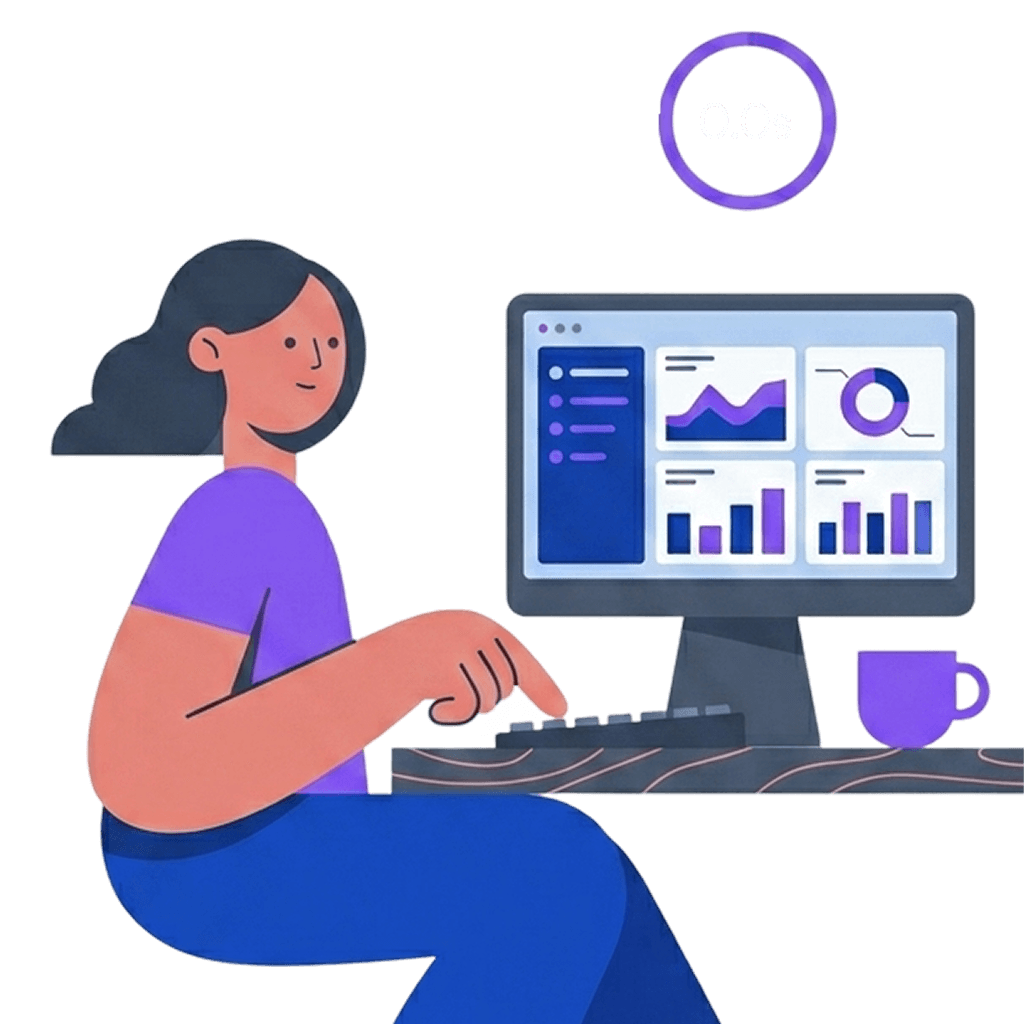
Cost and latency AI can't match.
Rules cost nothing and run instantly. Using AI where rules suffice pays inference costs for a slower, less predictable result.
The Static Layer - Built to Adapt Without AI
The static layer is the rules-based foundation underneath everything else: role-aware layouts, time-of-day adaptation, threshold-triggered alerts. It runs without AI, costs nothing per session, and stays functional regardless of what happens upstream.
Role Logic - 3 Config for 3 Roles
Role identity is a known input. A salesperson signs in, their account has their role attached, the layout configures itself. The system doesn't guess what it can read.
Role maps to information needs.
Sales reps need action-first layouts. Managers need pipeline-wide visibility. Executives need forecast and trend signals. These aren't preferences that vary by user, they're job functions that map to data needs.
Config beats inference.
Role-based layout is a lookup, not a prediction. Zero cost, instant speed, fully testable. Every layout works the same way for every user in that role, every time.
Forecast shows different content for each role
Contextual Logic - Time and Risk As Signals
The dashboard shifts based on observable signals: time of day, fiscal cycles, and urgency thresholds. None of these need AI to detect.
Morning mode prioritizes actions
Afternoon mode focuses on logging and review
At-risk mode surfaces deals needing attention
The signals are deterministic.
Time of day is the clock. Fiscal cycle is the calendar. Urgency thresholds are comparisons against rules. Each signal is fast to compute, easy to explain, and trivial to debug. AI would add latency and opacity to something that runs in microseconds.
The patterns are stable across users
User testing confirmed it: time-of-day and threshold-based shifts felt invisible to users. Most didn't notice the adaptation happening. They just noticed the dashboard felt right for the moment.
Why Static Layer Comes Before AI
Every product that depends on AI has a moment when the AI fails. Inference times out. The model returns nonsense. The service has an outage. Every major AI provider has had public outages this year. When that happens, the user still has a job to do, and the product still needs to be useful.
Fallback when the AI doesn't show up
When the AI fails, the dashboard doesn't. Role defaults, time-of-day shifts, and at-risk alerts keep working without it. Graceful degradation is mandatory for trust in AI products.
Stability for users who don't want surprises
User testing showed people were surprised when agentic UI helped instead of disrupted. The static layer keeps everything working for users who'd rather skip the AI.
Cost and latency AI can't match.
Rules cost nothing and run instantly. Using AI where rules suffice pays inference costs for a slower, less predictable result.
The Static Layer - Built to Adapt Without AI
The static layer is the rules-based foundation underneath everything else: role-aware layouts, time-of-day adaptation, threshold-triggered alerts. It runs without AI, costs nothing per session, and stays functional regardless of what happens upstream.
Role Logic - 3 Config for 3 Roles
Role identity is a known input. A salesperson signs in, their account has their role attached, the layout configures itself. The system doesn't guess what it can read.
Role maps to information needs.
Sales reps need action-first layouts. Managers need pipeline-wide visibility. Executives need forecast and trend signals. These aren't preferences that vary by user, they're job functions that map to data needs.
Config beats inference.
Role-based layout is a lookup, not a prediction. Zero cost, instant speed, fully testable. Every layout works the same way for every user in that role, every time.
Forecast shows different content for each role
Contextual Logic - Time and Risk As Signals
The dashboard shifts based on observable signals: time of day, fiscal cycles, and urgency thresholds. None of these need AI to detect.
Morning mode prioritizes actions
Afternoon mode focuses on logging and review
At-risk mode surfaces deals needing attention
The signals are deterministic.
Time of day is the clock. Fiscal cycle is the calendar. Urgency thresholds are comparisons against rules. Each signal is fast to compute, easy to explain, and trivial to debug. AI would add latency and opacity to something that runs in microseconds.
The patterns are stable across users
User testing confirmed it: time-of-day and threshold-based shifts felt invisible to users. Most didn't notice the adaptation happening. They just noticed the dashboard felt right for the moment.
Why Static Layer Comes Before AI
Every product that depends on AI has a moment when the AI fails. Inference times out. The model returns nonsense. The service has an outage. Every major AI provider has had public outages this year. When that happens, the user still has a job to do, and the product still needs to be useful.
Fallback when the AI doesn't show up
When the AI fails, the dashboard doesn't. Role defaults, time-of-day shifts, and at-risk alerts keep working without it. Graceful degradation is mandatory for trust in AI products.
Stability for users who don't want surprises
User testing showed people were surprised when agentic UI helped instead of disrupted. The static layer keeps everything working for users who'd rather skip the AI.
Cost and latency AI can't match.
Rules cost nothing and run instantly. Using AI where rules suffice pays inference costs for a slower, less predictable result.
The Static Layer - Built to Adapt Without AI
The static layer is the rules-based foundation underneath everything else: role-aware layouts, time-of-day adaptation, threshold-triggered alerts. It runs without AI, costs nothing per session, and stays functional regardless of what happens upstream.
Role Logic - 3 Config for 3 Roles
Role identity is a known input. A salesperson signs in, their account has their role attached, the layout configures itself. The system doesn't guess what it can read.
Role maps to information needs.
Sales reps need action-first layouts. Managers need pipeline-wide visibility. Executives need forecast and trend signals. These aren't preferences that vary by user, they're job functions that map to data needs.
Config beats inference.
Role-based layout is a lookup, not a prediction. Zero cost, instant speed, fully testable. Every layout works the same way for every user in that role, every time.
Forecast shows different content for each role
Contextual Logic - Time and Risk As Signals
The dashboard shifts based on observable signals: time of day, fiscal cycles, and urgency thresholds. None of these need AI to detect.
Morning mode prioritizes actions
Afternoon mode focuses on logging and review
At-risk mode surfaces deals needing attention
The signals are deterministic.
Time of day is the clock. Fiscal cycle is the calendar. Urgency thresholds are comparisons against rules. Each signal is fast to compute, easy to explain, and trivial to debug. AI would add latency and opacity to something that runs in microseconds.
The patterns are stable across users
User testing confirmed it: time-of-day and threshold-based shifts felt invisible to users. Most didn't notice the adaptation happening. They just noticed the dashboard felt right for the moment.
Why Static Layer Comes Before AI
Every product that depends on AI has a moment when the AI fails. Inference times out. The model returns nonsense. The service has an outage. Every major AI provider has had public outages this year. When that happens, the user still has a job to do, and the product still needs to be useful.
Fallback when the AI doesn't show up
When the AI fails, the dashboard doesn't. Role defaults, time-of-day shifts, and at-risk alerts keep working without it. Graceful degradation is mandatory for trust in AI products.
Stability for users who don't want surprises
User testing showed people were surprised when agentic UI helped instead of disrupted. The static layer keeps everything working for users who'd rather skip the AI.
Cost and latency AI can't match.
Rules cost nothing and run instantly. Using AI where rules suffice pays inference costs for a slower, less predictable result.
AI Layer - Built to Learn From Users
The AI layer is where intelligence earns its place. It learns how each user works across sessions and acts as a co-worker the user can talk to. Both operate within deliberate bounds.
Why an AI Layer at All
The static layer handles what rules can describe: roles, time of day, urgency thresholds. The AI layer handles what rules can't: how each individual user works across many sessions, and what they want to do in natural language. These are the two places where rules end and AI earns its place.
Agentic UI - Layout Reshaping Between Sessions
The AI layer learns each user's habits across sessions, then ranks modules into prominence tiers and sets filter defaults accordingly. Updates happen between sessions, never during.
Default layout based on role only
Adapted layout based on user behavior across 5 sessions
Why Agentic UI Here:
The signal is behavioral, not declarative. Users can't reliably tell you what their best dashboard looks like. Their behavior across many sessions can.
The right configuration is individual within role. Rules describe "sales rep" generically. They can't describe how each rep works within that role.
The benefit compounds with use. Each session refines what the dashboard knows about the user. The product gets better without configuration work.
The Agentic UI Logic Iterations
My Design Principle of Agentic UI
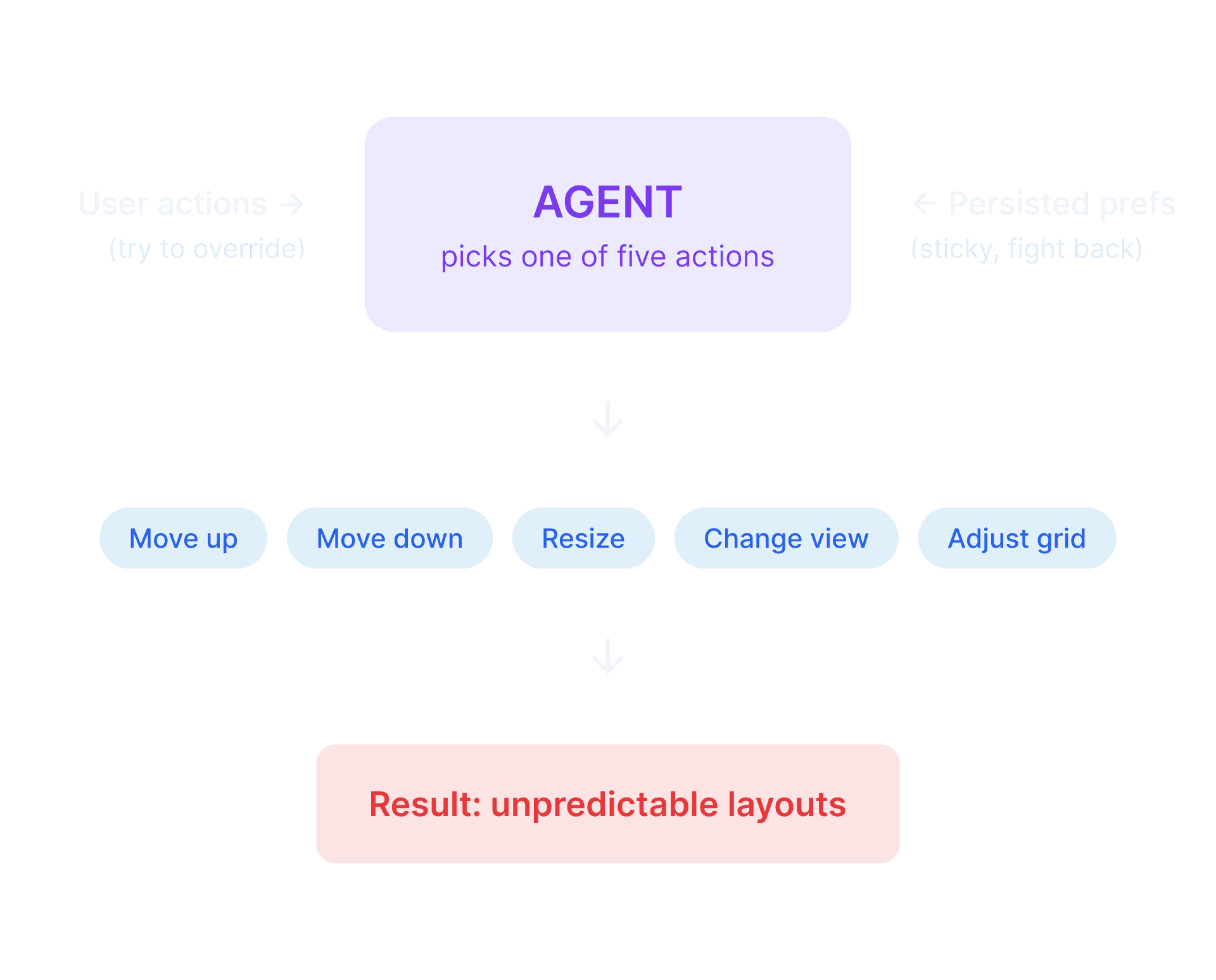
A fully generated UI is technically possible in 2026, and several SaaS products shipped this and walked it back when users couldn't learn from a moving target. Velocity takes the opposite position: AI earns its place when it learns from user habit, not when it predicts user intent. The layer does less on purpose, because every action the AI doesn't take is a place the user doesn't need to second-guess the product.
V1: Confidence-Based Logic
Only act when confident
Wait for stable patterns
Changes feel unresponsive or unexpected
Where V1 fell short: The agent had five overlapping actions, three confidence gates, and saved preferences that fought against current behavior. Promoting one module could conflict with resizing another. The system worked, but layouts shifted in ways users couldn't predict.
V2: Rank-Bounded Agent
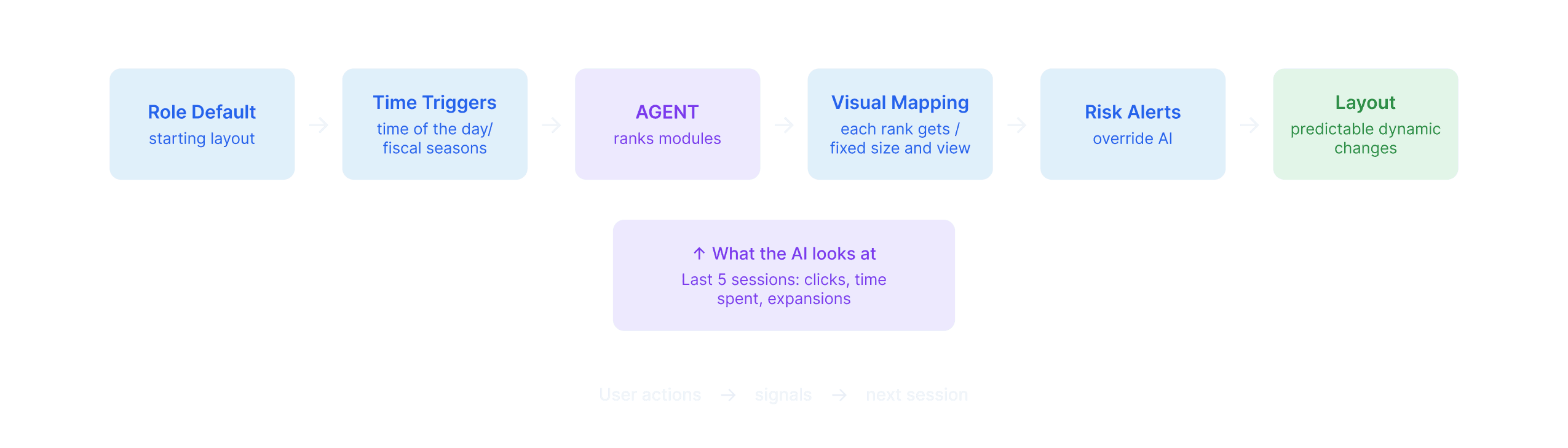
Rank modules into three tiers
Cross-session updates only, never mid-task
Changes feel predictable and earned
Why V2 works: V2 makes three deliberate calls: the agent has one decision (rank modules into tiers), the visual treatment for each tier is fixed by design, and the agent only acts between sessions. Discipline about what NOT to let the AI do is the design judgment.
What it brings for users: The dashboard arrives "just right" at the start of every session and stays put while you work. Personalization that's invisible to discover, and never disrupts what you're doing.
A Co-Work AI That Acts Beyond Answers
The Co-Work AI performs tasks the user would otherwise have to click through the interface to complete: log a call, surface at-risk deals, draft a follow-up, or jump to a module. It acts on the UI, not beside it.
Why This Approach Here:
Speed without delegation. Users get faster without handing control to the AI.
The UI stays the source of truth. When the chatbot proposes an action, it highlights the relevant module.
The user always has the last word. Confirmation for actions makes wrong calls reversible.
What The Co-Work AI Doesn't Do
- No skipping confirmation, ever.
- No volunteering recommendations.
- No cross-session memory.
The agent logs a call from a single message
The AI Trust Building Signals
Users won't use AI features they don't trust, and shouldn't trust AI features blindly. Velocity threads that line through three signals.
Control
Every AI feature can be turned off, individually or all at once. The product stays fully functional either way.
Transparency
Co-WorkAI never acts or fetches data silently. It points users to the source or surfaces drafts for review before anything is committed.
Risk Avoidance
The static layer ships fully functional underneath the AI. If the AI fails or hits an edge case, the product keeps working.
AI Layer - Built to Learn From Users
The AI layer is where intelligence earns its place. It learns how each user works across sessions and acts as a co-worker the user can talk to. Both operate within deliberate bounds.
Why an AI Layer at All
The static layer handles what rules can describe: roles, time of day, urgency thresholds. The AI layer handles what rules can't: how each individual user works across many sessions, and what they want to do in natural language. These are the two places where rules end and AI earns its place.
Agentic UI - Layout Reshaping Between Sessions
The AI layer learns each user's habits across sessions, then ranks modules into prominence tiers and sets filter defaults accordingly. Updates happen between sessions, never during.
Default layout based on role only
Adapted layout based on user behavior across 5 sessions
Why Agentic UI Here:
The signal is behavioral, not declarative. Users can't reliably tell you what their best dashboard looks like. Their behavior across many sessions can.
The right configuration is individual within role. Rules describe "sales rep" generically. They can't describe how each rep works within that role.
The benefit compounds with use. Each session refines what the dashboard knows about the user. The product gets better without configuration work.
The Agentic UI Logic Iterations
My Design Principle of Agentic UI
A fully generated UI is technically possible in 2026, and several SaaS products shipped this and walked it back when users couldn't learn from a moving target. Velocity takes the opposite position: AI earns its place when it learns from user habit, not when it predicts user intent. The layer does less on purpose, because every action the AI doesn't take is a place the user doesn't need to second-guess the product.
V1: Confidence-Based Logic
Only act when confident
Wait for stable patterns
Changes feel unresponsive or unexpected
Where V1 fell short: The agent had five overlapping actions, three confidence gates, and saved preferences that fought against current behavior. Promoting one module could conflict with resizing another. The system worked, but layouts shifted in ways users couldn't predict.
V2: Rank-Bounded Agent
Rank modules into three tiers
Cross-session updates only, never mid-task
Changes feel predictable and earned
Why V2 works: V2 makes three deliberate calls: the agent has one decision (rank modules into tiers), the visual treatment for each tier is fixed by design, and the agent only acts between sessions. Discipline about what NOT to let the AI do is the design judgment.
What it brings for users: The dashboard arrives "just right" at the start of every session and stays put while you work. Personalization that's invisible to discover, and never disrupts what you're doing.
A Co-Work AI That Acts Beyond Answers
The Co-Work AI performs tasks the user would otherwise have to click through the interface to complete: log a call, surface at-risk deals, draft a follow-up, or jump to a module. It acts on the UI, not beside it.
Why This Approach Here:
Speed without delegation. Users get faster without handing control to the AI.
The UI stays the source of truth. When the chatbot proposes an action, it highlights the relevant module.
The user always has the last word. Confirmation for actions makes wrong calls reversible.
What The Co-Work AI Doesn't Do
- No skipping confirmation, ever.
- No volunteering recommendations.
- No cross-session memory.
The agent logs a call from a single message
The AI Trust Building Signals
Users won't use AI features they don't trust, and shouldn't trust AI features blindly. Velocity threads that line through three signals.
Control
Every AI feature can be turned off, individually or all at once. The product stays fully functional either way.
Transparency
Co-WorkAI never acts or fetches data silently. It points users to the source or surfaces drafts for review before anything is committed.
Risk Avoidance
The static layer ships fully functional underneath the AI. If the AI fails or hits an edge case, the product keeps working.
AI Layer - Built to Learn From Users
The AI layer is where intelligence earns its place. It learns how each user works across sessions and acts as a co-worker the user can talk to. Both operate within deliberate bounds.
Why an AI Layer at All
The static layer handles what rules can describe: roles, time of day, urgency thresholds. The AI layer handles what rules can't: how each individual user works across many sessions, and what they want to do in natural language. These are the two places where rules end and AI earns its place.
Agentic UI - Layout Reshaping Between Sessions
The AI layer learns each user's habits across sessions, then ranks modules into prominence tiers and sets filter defaults accordingly. Updates happen between sessions, never during.
Default layout based on role only
Adapted layout based on user behavior across 5 sessions
Why Agentic UI Here:
The signal is behavioral, not declarative. Users can't reliably tell you what their best dashboard looks like. Their behavior across many sessions can.
The right configuration is individual within role. Rules describe "sales rep" generically. They can't describe how each rep works within that role.
The benefit compounds with use. Each session refines what the dashboard knows about the user. The product gets better without configuration work.
The Agentic UI Logic Iterations
My Design Principle of Agentic UI
A fully generated UI is technically possible in 2026, and several SaaS products shipped this and walked it back when users couldn't learn from a moving target. Velocity takes the opposite position: AI earns its place when it learns from user habit, not when it predicts user intent. The layer does less on purpose, because every action the AI doesn't take is a place the user doesn't need to second-guess the product.
V1: Confidence-Based Logic
Only act when confident
Wait for stable patterns
Changes feel unresponsive or unexpected
Where V1 fell short: The agent had five overlapping actions, three confidence gates, and saved preferences that fought against current behavior. Promoting one module could conflict with resizing another. The system worked, but layouts shifted in ways users couldn't predict.
V2: Rank-Bounded Agent
Rank modules into three tiers
Cross-session updates only, never mid-task
Changes feel predictable and earned
Why V2 works: V2 makes three deliberate calls: the agent has one decision (rank modules into tiers), the visual treatment for each tier is fixed by design, and the agent only acts between sessions. Discipline about what NOT to let the AI do is the design judgment.
What it brings for users: The dashboard arrives "just right" at the start of every session and stays put while you work. Personalization that's invisible to discover, and never disrupts what you're doing.
A Co-Work AI That Acts Beyond Answers
The Co-Work AI performs tasks the user would otherwise have to click through the interface to complete: log a call, surface at-risk deals, draft a follow-up, or jump to a module. It acts on the UI, not beside it.
Why This Approach Here:
Speed without delegation. Users get faster without handing control to the AI.
The UI stays the source of truth. When the chatbot proposes an action, it highlights the relevant module.
The user always has the last word. Confirmation for actions makes wrong calls reversible.
What The Co-Work AI Doesn't Do
- No skipping confirmation, ever.
- No volunteering recommendations.
- No cross-session memory.
The agent logs a call from a single message
The AI Trust Building Signals
Users won't use AI features they don't trust, and shouldn't trust AI features blindly. Velocity threads that line through three signals.
Control
Every AI feature can be turned off, individually or all at once. The product stays fully functional either way.
Transparency
Co-WorkAI never acts or fetches data silently. It points users to the source or surfaces drafts for review before anything is committed.
Risk Avoidance
The static layer ships fully functional underneath the AI. If the AI fails or hits an edge case, the product keeps working.
AI Layer - Built to Learn From Users
The AI layer is where intelligence earns its place. It learns how each user works across sessions and acts as a co-worker the user can talk to. Both operate within deliberate bounds.
Why an AI Layer at All
The static layer handles what rules can describe: roles, time of day, urgency thresholds. The AI layer handles what rules can't: how each individual user works across many sessions, and what they want to do in natural language. These are the two places where rules end and AI earns its place.
Agentic UI - Layout Reshaping Between Sessions
The AI layer learns each user's habits across sessions, then ranks modules into prominence tiers and sets filter defaults accordingly. Updates happen between sessions, never during.
Default layout based on role only
Adapted layout based on user behavior across 5 sessions
Why Agentic UI Here:
The signal is behavioral, not declarative. Users can't reliably tell you what their best dashboard looks like. Their behavior across many sessions can.
The right configuration is individual within role. Rules describe "sales rep" generically. They can't describe how each rep works within that role.
The benefit compounds with use. Each session refines what the dashboard knows about the user. The product gets better without configuration work.
The Agentic UI Logic Iterations
My Design Principle of Agentic UI
A fully generated UI is technically possible in 2026, and several SaaS products shipped this and walked it back when users couldn't learn from a moving target. Velocity takes the opposite position: AI earns its place when it learns from user habit, not when it predicts user intent. The layer does less on purpose, because every action the AI doesn't take is a place the user doesn't need to second-guess the product.
V1: Confidence-Based Logic
Only act when confident
Wait for stable patterns
Changes feel unresponsive or unexpected
Where V1 fell short: The agent had five overlapping actions, three confidence gates, and saved preferences that fought against current behavior. Promoting one module could conflict with resizing another. The system worked, but layouts shifted in ways users couldn't predict.
V2: Rank-Bounded Agent
Rank modules into three tiers
Cross-session updates only, never mid-task
Changes feel predictable and earned
Why V2 works: V2 makes three deliberate calls: the agent has one decision (rank modules into tiers), the visual treatment for each tier is fixed by design, and the agent only acts between sessions. Discipline about what NOT to let the AI do is the design judgment.
What it brings for users: The dashboard arrives "just right" at the start of every session and stays put while you work. Personalization that's invisible to discover, and never disrupts what you're doing.
A Co-Work AI That Acts Beyond Answers
The Co-Work AI performs tasks the user would otherwise have to click through the interface to complete: log a call, surface at-risk deals, draft a follow-up, or jump to a module. It acts on the UI, not beside it.
Why This Approach Here:
Speed without delegation. Users get faster without handing control to the AI.
The UI stays the source of truth. When the chatbot proposes an action, it highlights the relevant module.
The user always has the last word. Confirmation for actions makes wrong calls reversible.
What The Co-Work AI Doesn't Do
- No skipping confirmation, ever.
- No volunteering recommendations.
- No cross-session memory.
The agent logs a call from a single message
The AI Trust Building Signals
Users won't use AI features they don't trust, and shouldn't trust AI features blindly. Velocity threads that line through three signals.
Control
Every AI feature can be turned off, individually or all at once. The product stays fully functional either way.
Transparency
Co-WorkAI never acts or fetches data silently. It points users to the source or surfaces drafts for review before anything is committed.
Risk Avoidance
The static layer ships fully functional underneath the AI. If the AI fails or hits an edge case, the product keeps working.
What User Testing Showed
To measure the success of this concept, professionals working in sales were invited in usability sessions.
82 SUS Score, 48 NPS
Quantitative data (n=19) show strong usability and high willingness to recommend this product to other users.
Real User Needs
Test participants expressed strong interest in using this product in real-world settings, and some inquired about its availability in the market.
Static vs AI Version A/B Testing
A side-by-side test against Salesforce or HubSpot isn't realistic, as they aren't accessible without being inside a company that uses them. The cleanest test available is internal: the same product, with the AI layer on and off. That's the experiment that actually answers the question, "Did the AI layer earn its place?"
Static Version
Task completion rate: 94%
First-time task completion (4 tasks avg): 43s
Same task after 8 sessions (1 task avg): 48s
AI-Feature Enabled
Task completion rate: 100%
First-time task completion (4 tasks avg): 36s
Same task after 8 sessions (1 task avg): 23s
Key Observations
The Co-work AI made finding and using specific features a guaranteed success.
Participants who adopted the Co-work AI had a higher task completion rate.
By the 8th try at the same task, 13 users had adopted Co-work AI as their core workflow.
No participants reported intrusiveness on the agentic UI.
What this proves, and what it doesn't
The data validates the design call (build AI, but bound it tightly) and the internal mechanics (the AI layer adds value across every measured dimension). Further A/B test against competitors could further validate the design or identify areas of improvements.
What User Testing Showed
To measure the success of this concept, professionals working in sales were invited in usability sessions.
82 SUS Score, 48 NPS
Quantitative data (n=19) show strong usability and high willingness to recommend this product to other users.
Real User Needs
Test participants expressed strong interest in using this product in real-world settings, and some inquired about its availability in the market.
Static vs AI Version A/B Testing
A side-by-side test against Salesforce or HubSpot isn't realistic, as they aren't accessible without being inside a company that uses them. The cleanest test available is internal: the same product, with the AI layer on and off. That's the experiment that actually answers the question, "Did the AI layer earn its place?"
Static Version
Task completion rate: 94%
First-time task completion (4 tasks avg): 43s
Same task after 8 sessions (1 task avg): 48s
AI-Feature Enabled
Task completion rate: 100%
First-time task completion (4 tasks avg): 36s
Same task after 8 sessions (1 task avg): 23s
Key Observations
The Co-work AI made finding and using specific features a guaranteed success.
Participants who adopted the Co-work AI had a higher task completion rate.
By the 8th try at the same task, 13 users had adopted Co-work AI as their core workflow.
No participants reported intrusiveness on the agentic UI.
What this proves, and what it doesn't
The data validates the design call (build AI, but bound it tightly) and the internal mechanics (the AI layer adds value across every measured dimension). Further A/B test against competitors could further validate the design or identify areas of improvements.
What User Testing Showed
To measure the success of this concept, professionals working in sales were invited in usability sessions.
82 SUS Score, 48 NPS
Quantitative data (n=19) show strong usability and high willingness to recommend this product to other users.
Real User Needs
Test participants expressed strong interest in using this product in real-world settings, and some inquired about its availability in the market.
Static vs AI Version A/B Testing
A side-by-side test against Salesforce or HubSpot isn't realistic, as they aren't accessible without being inside a company that uses them. The cleanest test available is internal: the same product, with the AI layer on and off. That's the experiment that actually answers the question, "Did the AI layer earn its place?"
Static Version
Task completion rate: 94%
First-time task completion (4 tasks avg): 43s
Same task after 8 sessions (1 task avg): 48s
AI-Feature Enabled
Task completion rate: 100%
First-time task completion (4 tasks avg): 36s
Same task after 8 sessions (1 task avg): 23s
Key Observations
The Co-work AI made finding and using specific features a guaranteed success.
Participants who adopted the Co-work AI had a higher task completion rate.
By the 8th try at the same task, 13 users had adopted Co-work AI as their core workflow.
No participants reported intrusiveness on the agentic UI.
What this proves, and what it doesn't
The data validates the design call (build AI, but bound it tightly) and the internal mechanics (the AI layer adds value across every measured dimension). Further A/B test against competitors could further validate the design or identify areas of improvements.
What User Testing Showed
To measure the success of this concept, professionals working in sales were invited in usability sessions.
82 SUS Score, 48 NPS
Quantitative data (n=19) show strong usability and high willingness to recommend this product to other users.
Real User Needs
Test participants expressed strong interest in using this product in real-world settings, and some inquired about its availability in the market.
Static vs AI Version A/B Testing
A side-by-side test against Salesforce or HubSpot isn't realistic, as they aren't accessible without being inside a company that uses them. The cleanest test available is internal: the same product, with the AI layer on and off. That's the experiment that actually answers the question, "Did the AI layer earn its place?"
Static Version
Task completion rate: 94%
First-time task completion (4 tasks avg): 43s
Same task after 8 sessions (1 task avg): 48s
AI-Feature Enabled
Task completion rate: 100%
First-time task completion (4 tasks avg): 36s
Same task after 8 sessions (1 task avg): 23s
Key Observations
The Co-work AI made finding and using specific features a guaranteed success.
Participants who adopted the Co-work AI had a higher task completion rate.
By the 8th try at the same task, 13 users had adopted Co-work AI as their core workflow.
No participants reported intrusiveness on the agentic UI.
What this proves, and what it doesn't
The data validates the design call (build AI, but bound it tightly) and the internal mechanics (the AI layer adds value across every measured dimension). Further A/B test against competitors could further validate the design or identify areas of improvements.